Wednesday, 19 December 2012

Wednesday, 5 December 2012
What I need to do next
The next scene of my music video will be at the beach on a winters day, below is a list of things i need to do to prepare for the next scene.
- I need to get all the boys together to decide a time and date to go to the beach
- I need to think of transport, how we will all get to the beach
- I need to think about what costume i would like my characters to wear for this scene
- I need to think about if i need any other props or characters for the next scene
- Because a lot of the next scene is instrumental and not much singing i need to think about what i want the characters to be doing while they aren't singing.
- Linking back to my audience feedback, i need to think about how i am going to use a bigger variety of shots and how i am going to make the characters make more eye contact with the camera.
Audience Feedback
I showed my music video to a number of people in my class and asked them to give me feedback on my video so far and this is what they came up with.
Positive Feedback:
Positive Feedback:
- Very good lip syncing
- Good variety of shots, variety of angles
- Very good costume
- Costume and props represent the genre well
- Clear boyband genre
- Very good eye contact with the camera
- Good emotional facial expressions
- Stuck the the boyband genre well
- Very good framing in most of the shots
- The sepia and black and white effects work well
- Good transitions between shots
Negative Feedback:
- Need more locations
- More variety in the length of shots. e.g. extreme close up, long shot
- Framing is poor in some of the shots. e.g. cutting half of the character off
- More eye contact with the camera would be better
- Get the characters to do more, not just sit and sing
I will take all this feedback on board and take it into account when i go out to film the next scene of my music video.
Tuesday, 4 December 2012
Tuesday, 20 November 2012
Equipment I will use to make my music video


The pictures to the left and right show an apple macbook and an apple mac computer. These will be vital pieces of equipment when creating my music video because they have the editing soft wear. They both have soft wear such as Photoshop and iMovie which is what i will be using to create and edit my music video. You can get iMovie and Photoshop on standard windows computers but it costs more and doesnt work as effectively.

 Here is a picture of the video camera i will be using to film my music video. It is a standard Panosonic video recorder. I will be using this video camera because it is very simple to use and you can easily upload your recorded footage through the memory card it uses. The camera has good memory storage so it allows you to try out and be as creative with as many different shots as you like and it also has a very good picture quality which is key for a good quality music video.
Friday, 16 November 2012
Where I am going to film my music video - Location shots
I did some research on classic boyband music videos of bands such as Take That, Westlife and Boyzone and i looked to see what sort of locations they would be using. Below are the most common locations for a boyband music video.
The Beach

.jpg)

Recording Studio/small room

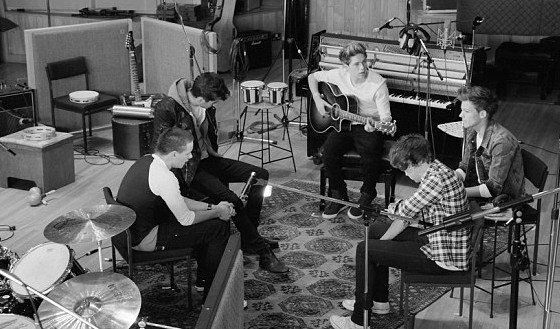

My research showed that the most common locations for a boyband music video were scenic areas such as beaches and small, close, recording studios or empty stages. To follow these conventions i knew i had to film my music video in these sort of locations, below are some pictures of where i am going to film my music video.

Wednesday, 7 November 2012
How I upload and edit videos

- Plug the firewire into the camera and computer
- Open iMovie on the computer
- Find the point on the camera where you want to start uploading
- Click import and wait for your video to import onto the computer from the camera
- Once the video has imported too iMovie you can cut away the points of the video you don't need.
- Once you are happy with the clip you have you can move the clip into the editing part of iMovie and edit the clip by adding sounds and effects
- Once you are happy with the final clip you upload the clip to Youtube
- You then find the clip on Youtube and you can embed the clip onto your blog from there.


Subscribe to:
Posts (Atom)